Darius Spirit Blossom from LoL Live Wallpaper 4K
Darius Spirit Blossom from LoL Live Wallpaper 4K
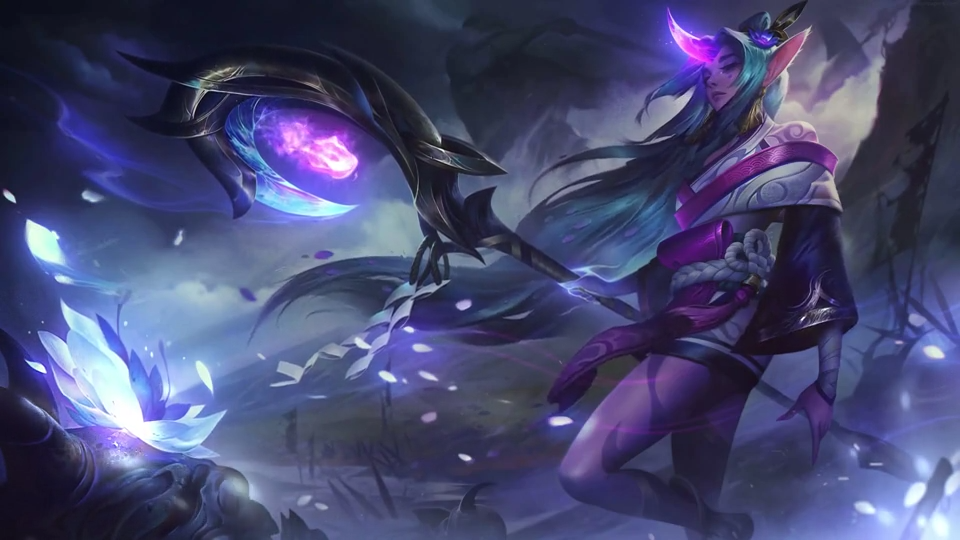
Bring the dark fantasy atmosphere of Spirit Blossom to your desktop with Darius Spirit Blossom from LoL Live Wallpaper 4K. Darius stands against a stormy backdrop, surrounded by vivid purple and blue energy, flowing petals, and spectral shapes.
Watch the lightweight video preview above, then download the full 3840 × 2160 MP4 to use with a compatible live wallpaper application such as Lively Wallpaper or Wallpaper Engine.
Wallpaper details
- Character: Darius from League of Legends.
- Theme: Spirit Blossom, dark fantasy, purple and blue.
- Download: 4K UHD, 3840 × 2160, MP4.
- Page preview: 960 × 540 MP4.
Darius Spirit Blossom download and preview
The download contains the full 4K video, approximately 25 seconds long and 31.44 MB in size. The preview is a separate 960 × 540 video of approximately 10 seconds, so it can load quickly while you check the artwork. Use the download button to obtain the full-resolution file rather than saving the page preview.
The 16:9 composition suits a widescreen desktop. Darius occupies the center of the image, with his axe and bright energy extending across the foreground. The darker background and violet highlights give this Darius Spirit Blossom wallpaper a dramatic look. Check the preview against your desktop icons to decide whether the composition works for your setup.
How to use this live wallpaper
- Download the 4K MP4 using the button on this page.
- Open a wallpaper application that supports local video files.
- Import the downloaded MP4 and select the monitor where you want to display it.
- Choose a fit or fill setting that suits your screen. A different screen ratio may crop the edges.
For more help, follow the LoopWalls live wallpaper installation guide. Keep the MP4 in its chosen folder so your wallpaper application can find it later.
Frequently asked questions
Is the download the same quality as the preview?
No. The download is 3840 × 2160, while the preview is 960 × 540. Both are MP4 video files, but the smaller preview does not represent the full detail of the downloadable wallpaper.
Does downloading the MP4 apply it automatically?
No. Downloading saves the video file. You still need to import it into a compatible wallpaper application and apply it to your desktop.
Display and playback tips
Start by checking the downloaded file in a normal video player. This helps you separate a file problem from a wallpaper application setting. If the MP4 plays there but your desktop remains still, return to the wallpaper app and confirm that the imported file is selected for the correct monitor.
For a 16:9 display, the source matches the screen shape. On an ultrawide or portrait monitor, filling the screen can remove part of the axe, petals, or energy at the edges. Try a fit setting first if you want to keep the complete composition visible, then compare it with fill before choosing.
If animation distracts you while working, check whether your wallpaper app offers pause controls. The same applies when using a laptop on battery or opening a demanding game. Available options depend on the application; the MP4 itself does not manage those settings.
Before reporting a download problem
Confirm that you downloaded the full Darius Spirit Blossom file, that the transfer finished, and that you have enough free storage. Keep the file extension as .mp4. If playback fails, try downloading it again and compare the file size with the value shown above. Include the application name and what happens when you open the file when describing the problem.
Explore more League of Legends wallpapers
Pair this scene with the Spirit Blossom Soraka live wallpaper. You can also learn about the character on the official Darius champion page.